


 Its a pleasure for me to share one of a Blogger tweak that we managed to implement on BloggingeHow.com recently that makes sure that every author's image is shown up beside their post titles, both on home and post pages. The dynamic tweak enables every individual authors in Blogger based blogs to get them selves showcased. Also as for readers, its a much satisfying thing to know the actual person behind the article. Its much easier to get your self related with the post. It will display author pics dynamically unlike the static way that Mohammad shared months ago which can be find here: Show Profile Avatars next to post titles.
LiveJournal is a great free resource for people who want to keep a log or a diary of sorts of theirs online, or share their life experiences with their friends and family. It allows people to make posts, and then cross-post and share on their social media profiles. Hence, these journals have all the markings of a blog. But for people who started off with LiveJournal, but aren't satisfied with the limited options it has, Blogger is a great option for them. Blogger is so much more than what LiveJournal is. So if you're not satisfied with LiveJournal, you can just move your blog from LiveJournal over to Blogger and get much more functionality.
Read more »

Blogger is a very widely used publishing platform, mostly because its strength lies in its simplicity and ease of use. It is quite easy to use, and is recommended for beginner bloggers who are looking for a quick and easy way to create a presence for themselves online. For bloggers who have created a WordPress blog, but are at a loss to maintain or modify it, they have a great option in Blogger. They can easily migrate their WordPress blog to Blogger without any hitch. In this post, we will talk about how you can shift from WordPress to free Blogger.
Read more »

You guys needed more tutorials? There we go with yet another unique and interesting hack for blogger Archive Widget. You can see at our sidebar area that the default BlogSpot archive widget is transformed into a Wordpress Type Archive calendar with custom styles and flavors. The easy script and stylesheet today will enable you all to create a calendar archive gadget for your blogs using MBT's custom style sheets for Dark and Light backgrounds. The script is coded by phydeaux3 and redesigned by MBT with custom colors and more easy installation. The plugin has been made compatible and easy to implement. Just follow the basic steps below.
Read more » BlogSpot templates are codded using the XHTML 1.0 Strict Document Type. It was developed by world wide web consortium on 26 January 2000. Unlike PHP or ASP.net the rules of XML are strict and unforgiving. A slight mistake in code results in terrifying error messages that you often see while editing your blog template. In order to understand how these templates are designed and programmed. You need to start from scratch. I was planning to release some grid and List view templates but the tough work schedule made it difficult to do so. However I am releasing today a simple code that will turn your test Blog's XML structure into a plain, empty template with no widgets. The entire blogger template consists of widgets that are operated and managed using classes and IDs. The blog posts section itself is a giant widget that can be styled in different ways. To make things simple I will share today how to create a blank HTML Page out of a Blogger Template and then start adding widgets to it to experiment exciting new ways of customizing the blog view.
The mobile phone is increasingly being used on the internet, what with the easy connectivity and mobile apps. Now, mobile blogging is on the rise, and you can even blog right from your cell phone! Many and more people are now using mobile devices to surf the internet, which is why bloggers are turning towards optimizing their blogs for mobile devices. Most of you might be familiar with Blogger Dynamic View, since more than 2 millions blogs have started using it ever since it was launched. Now, Google has integrated the flexibility of mobile usage with the functionality of Dynamic Views. You can now optimize your Blogger Dynamic View blogs for mobile to enhance user experience!
Read more »

 If you visit the Search, Advertise , 404 Error page or contact Page of MBT, you will observe that the entire page width expands and the sidebar wrapper which contains all widgets disappears. You will find these static pages and post sections looking like a plain Static HTML webpage with no labels, Author description, Icons and widgets. All that you see is a wide layout with some text and title. This is achieved by overwriting the Stylesheet with custom styles using conditional XML tags to remove certain sections of the blog layout. Sections that can be removed include your blog header, post body, sidebar, footer and what not! Today you will learn an easy way to achieve this and turn your featured pages and posts into a Website Look and not a weblog.
  Whenever, we think about the history of most productive Blogging platform the first word which clicks our mind is either WordPress or Blogger. Still lots of Well-known bloggers are in doldrums whether to select WordPress, or they should try their luck with Blogger. Blogger and WordPress have been competitors since an elongated period but in the meantime WordPress has developed tremendously, in spite of getting introduced before Blogger. Mohammad has covered lots of posts regarding avoiding Blogger to WordPress conversion but one should always know how to do something, so we may continue to make use of the resources. So in this article, we will cover How To Migrate Blogger to WordPress Blog without losing a single SERP Ranking or Page Rank Juice.
Google is the world's largest search engine. It crawls millions of webpages everyday. But one problem it faces is duplicate URLs on a website linking to the same content. For instance, the URLs example.com/blog/category/news and example.com/blog/index.php?category=news can both point to the same page, hence creating duplicates, and reducing site efficiency for Google's crawler. In the interest of good SEO, it is important that you optimize your URLs to avoid duplication. To this end, Google Webmaster Tools now gives you a Configure URL Parameters feature, which will help you recommend actions for the GoogleBot crawler to take, so as to increase your site's crawl efficiency. It will also lessen the resource burden on Google that goes into the crawling of your website. In this post, we will show you how to set easy settings for URL Parameters.
Update: Read: Optimize URL Parameters For Blogger
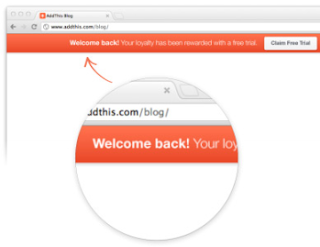
Blogging isn't just about building traffic. it is also about maintaining it. But for that traffic to be of any use to you, you should a good conversion rate, whereby visitors to your site at least take some action such as following you on Twitter, subscribing for your newsletter, visiting your old posts, and so on. There are many ways to increase your conversion. Here's another one. Add a welcome bar at the top of your website, and include calls to actions, such as sharing your page or liking it. That way, people can have easy access to your pages and links. The bar is provided by AddThis, a large sharing platform, and we have been showing you various sharing options for your blog that they provide. Here, we will show you how to use, and customize this bar.
 If you have made up your mind to migrate your Google blog to wordpress safely then redirecting your RSS subscribers and Email subscribers to Wordpress is a must thing to do. You will need to migrate only if you have changed your domain or moved your content to a new location or server. Since in case of blogger to self-hosted wordpress migration, domain remains the same therefore we will only need to redirect the Feed. Moving your bulk of readers from one platform to another is linked with your blog Feed address. BlogSpot blogs support both RSS and atom Feeds whilst wordpress supports RSS web Feeds alone (though you can use plugins to switch to atom). What we will learn today is to simply change the FEED address and let your readers to receive email updates via your new blogging platform. This method will shift your syndication from one network to another without losing a single subscriber. The steps are clearly demonstrated to make your job easy. Lets get things moving!
 Back in the year 2008 when Blogger.com was moving through several update phases, third party developers would often take the golden opportunity of creating widgets for BlogSpot blogs but as soon as Google rolled out massive changes to their online services, several official widgets popped out which load fast and perform well because the scripts are served by Blogger servers. Page List and label cloud/list enabled designers to create dynamic menus. Since the stylesheet was made accessible. therefore we all got a chance to play with these widgets and transform them completely in look and appearance. We shared tutorials first time on how to create dynamic menus with page list and an automatic menu with label list and today we would share a simple stylesheet that will transform the labels cloud into organized small blocks that rotate on mouse over. I must ensure you that the styles are perfectly compatible in all major browsers including IE8+.
Social Media promotion is every blogger's need. If a blog is an engine, then social media acts like a lubricant, without which a blog would stall. This is why bloggers need to share their awesome content so that people around the world can know about it. To that effect, Google is trying to help out bloggers by ruffling quite some feathers. Recently, Google released the Google Takeout service that lets you merge two Google Plus accounts together. Now, you can connect your Google Plus account with Blogger to easily share your posts and also gain recognition for your work on social media. A share box will automatically appear when you publish a post, with which you can instantly share your content with the world! We'll look at how we can do this in this post.

![15 Useful Tips To Write Killer Headlines [Post Titles]](https://blogger.googleusercontent.com/img/b/R29vZ2xl/AVvXsEi2J41YI1WlF946c0gH9oligzZl7ih_Agt1VLp4b9cQI4NTBA3Fn1DpT2FwI-Pl4vPObTcQ58icI9llhfCHLoAqjemOmfGSdrz25sNTwkZGyEtaLO43L3xchubRCTg_FBDnHInm7Dis5SI/?imgmax=800 "15 Useful Tips To Write Killer Headlines [Post Titles]")
It has been said that a book is judged by its cover and the proverb completely fits when it comes to choosing a heading for a post in blogging. I researched on this topic myself when I started off as a blogger, as from the very first day in this niche; I had been facing a lot of trouble in deciding how to choose effective Headings for my posts. It was soon that I realized that no matter how great content you produce, you still need to learn the art of writing headlines for it. Headlines play a real important role in bringing readers to your blog by selecting your blog out of many others that the search engines display.
Here are 15 Must follow tips to make your headings fruitful for your blog and make your blog a hit.
Read more »
 It is true that the decisions you take in a business initially, decide the future of the entire set up. Talking about blogging specifically, there are certain tips that you must know, understanding their significance in boosting your blog’s popularity. It is obvious that once you plan to be a blogger, you look forward to a huge traffic following you along with a considerably great revenue been generated. However, what makes your blog a hit is your attitude towards adopting the basic requirements of this domain. The Tips might differ person to person, but after researching for days and days about what were the magic ingredients that professional bloggers added in their blogs that are earning in Billions today, Here is a list of 35 Must follow tips that you need to add in your blogging career.
 Just recently while redesigning a client's website, we figured that Linkwithin can completely be customized by overriding its default stylesheet. We used Google Chrome to identify the classes and IDs. This let us change the background colors of the thumbnail images, change the title text color and margining, add cool hover effects and most importantly remove the linkwithin credit link and logo link that appears towards the bottom-right corner of the plugin. We have created a sample style with dark theme and we would like to share the stylesheet, using which you can add your creative new looks to it and blend it perfectly with your blog looks and feel. Both BlogSpot and wordpress users would find this tutorial useful because all you would need to do is to copy and paste a simple CSS code. Lets get to work!
 Google custom search engine for websites and blogs is another way to provide easy navigation to your visitors and readers as well as make some extra cash out of Adsense. Its best advantage is that it will help Google to index your pages quickly. All those pages which are indexed by this search box function is automatically indexed by robots and added to Google's databases. Its not just about Making money but about deep indexing and site navigation. After the introduction of Plus project, Google developers have transformed all services to look like Google Plus. They recently introduced a search box which looks exactly like Google's official search box. You can see it towards to top right corner of our site. If you insert a query inside the box and hit enter you will land on a different page where results are displayed.


