



As you might know, RSS Feeds are an alternative way of delivering your content to your readers. Not everyone that visited your site and liked your content will return again and again. Instead, you will have to deliver your content to them if they liked to your content, and say subscribed to your blog. They are, in fact, subscribing for your RSS feeds. These feeds will appear in their email inbox. Additionally, you can use your RSS feed to drive content on other sites of yours, or provide content to users on RSS readers. Feeds don't necessarily have to be from your blog. They can be from anything that's updated regularly, even your Google Plus. An engineer at Google developed a Chrome app, Feed+, that will allow you to create RSS feeds for your Google Plus!
Read more »

You might know AddThis from the sharing buttons you place on your blogs below your posts. The AddThis sharing tool is a really useful feature for bloggers. Not only does it provide you with a means to share your great content, it also monitors the information shared to analyze data and provide insights to publishers and note the latest trends. In the process, the AddThis sharing tool has evolved into a much faster and more powerful one which not only can easily be integrated with your website, it also provides a great and easy sharing experience to your readers. AddThis has recently released a sleeker, more elegant sharing tool which adds a lot of new features. Let's take a look at what's new, and how to get it!
Read more »

Twitter is a really great tool when it comes to looking up for news or getting updates from your favorite Twitterers. For bloggers, it's an especially good way to build interactions, and get ideas. In our blogging tips, we have countlessly discussed about following other blogs in your niche tio find out what's hot, and what they are doing. This gives you ideas to improve your own blog. But how to find such blogs? More importantly, how to look for people who share interesting stuff that relates to your own niche as well? Here are some tools that we believe could be invaluable to searchers looking for updates and ideas on Twitter.
Read more »
This App has been specially developed for "MBT Readers" by Lubna Essa, an Android developer . We are featuring it here and sharing the download link. If you wish to order similar Android apps, you may contact her anytime at lubna.essa@live.com
 Staying updated with the latest happenings is by far the most important thing for every individual in this digital age. Whether you are a programmer or a blogger or a housewife or a businessman or a technician or anything, you read the newspaper, you check the internet just for the sake of staying updated so that you may not stay behind. But wait for a moment here and think "Don’t you want an application that actually lets you stay updated just through home screen of your Android phone?"
 If you are a person who uses the PC just to get some daily updates, then let there be something that can save you the hassle of turning on and off your pc all the time to get updates. Just tap on your phone screen and get all you want because it is designed absolutely for you!
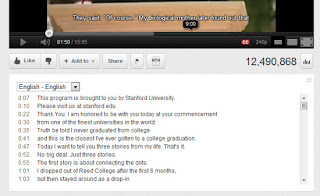
Interactive Transcripts is a cool, relatively new YouTube feature that is designed to enhance your video-viewing experience. You might already be familiar with subtitles for films. They are there to supplement the audio to help viewers better understand what's being said. YouTube now has a feature, Interactive Transcripts, which act just as subtitles, but they are interactive, which means not only can they be played with the video, they can also shown separately and made clickable, so that when you click on a certain piece of text, it will take you to that point in the video where it was said. In this post, we'll talk about how you can create transcripts, and how to add them to your YouTube videos.
Read more »


As many of you might already know, Bitly is the largest Link Shortening service. In fact, it is the one responsible for ushering the world into the concept of short links four years ago. Since then, it has been extensively been used to replace long URLs into a collection of just a few characters, which can be easily shared on social media such as Facebook and Twitter. It came is handy especially for twitter, where there is a character limit on tweets. Well now, after almost four years, Bitly has finally collected enough data to create a whole new search engine of its own! Bitly calls it "Real-time", and describes it as an "Attention Ranking" Search Engine. Although still in its beta phase, it has been rolled out to the public. It can be accessed at http://rt.ly.

Facebook might now be facing a grim reality after a latest survey by the American Customer Satisfaction Index (ACSI), which revealed that Facebook users are not satisfied with the happenings at the social network lately. More worrisome for Facebook is the fact that while its customer satisfaction is plummeting downwards, its rival network, Google Plus, is catching up fast! Not only that, other social networks like Twitter and LinkedIn have overtaken it as well with respect to customer satisfaction. To make matters worse, Facebook hasn't made much of a mark ever since its IPO and its first quarterly earnings as a public company. So what does this mean? Has Google Plus finally found the opening it has been looking for, or has Facebook yet to see the worst?

In this holy and blessed month of Ramadan, Google presents a gift to more than a billion Muslims all around the world by launching a YouTube channel where you can watch and listen to live Tarawih prayers, and see special programs related to Ramadan Kareem. The prayers and other programs are broadcasted live through YouTube, with good audio and video streaming quality. This is indeed a great gift to those who haven't been there, or want to listen to the Imam-e-Kaba recite the Holy Quran during Tarawih Prayers. The Channel was made live on 20th June. During the time when there are no on-going prayers, the channel shows other streams from Masjid-al-Haram and The Kaaba.
Read more »

Social Media promotion is every blogger's need. If a blog is an engine, then social media acts like a lubricant, without which a blog would stall. This is why bloggers need to share their awesome content so that people around the world can know about it. To that effect, Google is trying to help out bloggers by ruffling quite some feathers. Recently, Google released the Google Takeout service that lets you merge two Google Plus accounts together. Now, you can connect your Google Plus account with Blogger to easily share your posts and also gain recognition for your work on social media. A share box will automatically appear when you publish a post, with which you can instantly share your content with the world! We'll look at how we can do this in this post.

When Google Plus originally started out more than an year ago, it was somewhat exclusive to Gmail accounts. most people signed up using their Gmail accounts, which might not have been their primary accounts. So they ended up with their Google+ operating on one Google account, and other services on another. In such a scenario, managing multiple Google+ accounts can be a headache, especially since you need to log out of one to use the other (unless you're comfortable with changing your browser). An any case, you might end up having two Google+ profiles, with similar friends, or more followers on the account you do not want. Well now, there's a solution for you. You can merge your Google+ accounts together into one, so you can easily manage your circles, posts, photos, and more!

Since the day Facebook launched its Facebook Chat, many of us have been waiting for some improvements in the chat options but till now, Facebook provides no high level options to customize the chat. If you are a consistent Facebook user, you must be suffering at your end as well with the irritating Facebook Chat box that keeps on bugging you if you are online. This default chat box keeps on popping up. The worst part is the fact that you cannot move the box around, cannot minimize it for as long as you wish no options available to change size and fonts and most importantly, you cannot share emotions with the Facebook Chat. Many people, due to the mentioned reasons, hardly turn back to Facebook Chat as the primary Chatting platform and are force to look for other alternatives like Skype, Windows Live and Yahoo. its natural that maintaining several messengers at the same time can be too much irritating at times, where forgetting the password is a common practice.
In the month of April’12, Facebook introduced its Chat messenger, which is a disaster itself and the consumers hold mixed feelings for it. This messenger too, has no option to customize the font and the size as well as there is no reference of the contacts that are currently online.

 This is one of the few social sharing widgets that took a lot of my time in designing it. You have seen the trend of floating sharing count buttons on popular blogs. The traditional icons are now replaced with auto incremented counter buttons that are updated in seconds. We created different versions of this bar applying both Jquery effects and CSS3 styles but this widget is different because it contains custom twitter, pinterest and an Email button. Services like Addthis and Sharethis are both doing a great job but they still need to work on some of their plugin integration conflicts. Pinterest pin it buttons are causing great trouble and it badly fails in fetching the correct thumbnail image. In most cases it does not even select a image thus making the entire pinning concept tasteless. We however redesigned the widget provided by shareThis to create a new one by correcting all flaws. This sharing bar would float to the left of your blog posts and would float as the visitor scrolls up or down. This widget contains counters of important social networking sites that has the potential to bring you traffic by circulating your content to a wider audience. We have tested the widget on major browsers like IE7+, Firefox, Chrome etc. and found it working just fine with no compatibility issues or design conflicts.
 Developers and bloggers are requested to link back to this post if in case they wish to share our code with their readers. Lets get to work now!



You don't need to chat from your browser anymore. Relax and chat right from your very own desktop with this latest Facebook Instant Messenger Tool.
Read more »


